Showing posts with label Phone. Show all posts

Tuesday, November 26, 2013

The HTC One to Win or Snag

I hope that you'll forgive that this post is long overdue. Between moving in with and getting married to my now husband, the past few months have been chaotic to say the least, now I finally have a chance to share what I have been meaning to for months! On the day before my move, I was invited to hang out with editors from accross the world as we got to try out the HTC One while touring the city on a special HTC Design Tour.

Our tour was curated by the staff at HTC and gave us an inside look into a city that I have lived in for the past seven years. Fortunately for me I saw places that I never would have thought to go. Adventures that I might not have otherwise taken. Design to want to own and new places to make wish lists for all while testing out the HTC One. After the tour, I was a believer that the HTC One was the slickest phone around.

With dual front speakers and sound by Beats by Dr. Dre, the phone offers unparalleled sound. What silly industrial designer decided to put speakers on the back of a phone originally anyways?

In addition, the camera was fully loaded to take burst shots where you could save all or just the best shots, slow-mo video, take pictures from your video footage, snap pictures and video simultaneously and the cherry on top of it all the HTC Zoe.

What is the Zoe? It allows you to take high definition 3 seconds snippets of footage at a time. Sort of a moving snapshot that can be combined with photos and videos at the end of the day for a seamless low effort 60-second music video of your day without any effort at all. For me, I used HTC Zoe to record moments during my honeymoon and share the events of each day in an exciting format with my friends and family on Facebook to which I received many oohs and ahhs. There are 12 exciting and different themes each with their own photo effects and music.

Now taking a note from the gold hardware and accessories that are ever popular with the fashion set, the HTC One is getting a limited edition luxury upgrade to win. From now through January 5th, six lucky tweeters will have the chance to win a very special 24kt gold HTC One! 

Starting, November 25th, HTC will be unveiling a digital billboard in Times Square showcasing beautiful photos taken by visitors to Times Square and people across the U.S. In addition to the thrill of having their images splashed across Times Square, those who submit photos may also be eligible for a chance to win an HTC One each week, and two lucky winners will receive a special edition 24kt gold-plated HTC One valued at more than $2500. For more details click here.

If you're not up for trying your luck at winning, HTC is offering a pretty amazing two-day Black Friday offer for the HTC One with service from Sprint or Verizon. For just $29.99 you can snag your own HTC One on November 29th and November 30th. For those customers that can’t wait or don't want to deal with Black Friday madness, the HTC One with Sprint or Verizon service will be priced at $49.99 starting November 25 through December 7.

It is seriously one of the best phones on the market and I prefer it to my husband's iPhone 5S for both the sound and the camera features. He is a bit jealous of the Zoe abilities in particular! So why wait to check it out!

Tuesday, July 26, 2011

A Little Follow Up:Droid Incredible 2

For the couple months, Erin and I have been using HTC's Droid Incredible 2 on Verizon. As you may remember were reviewed and loved the first Droid Incredible. And as I've mentioned in previous tech reviews, I'm no expert when it comes to tech specs, but I can perspective of someone who uses the smartphone a lot for work and leisure. I just want to know if a device is easy to use, reliable and if it'll fit nicely into my clutch when I go out.

The new Incredible 2 is definitely an improvement over the already great Incredible 1, and there are more apps available in the Android Marketplace compared to last summer. Some of the key updates and highlights of the HTC Incredible 2:

It's so fast! Almost everything felt instant, even browsing through photo albums on Facebook. Sometimes things would load quicker than I could hit the back button. A couple of my friends were so impressed they bought the Incredible 2 instead of iPhone 4 when their AT&T contracts were up.

The universal back and search buttons are handy. A few weeks ago, I saw a presentation at Ignite NYC by Whitney Hess, Design Principles: The Philosophy of UX , and in her presentation, she mentions the importance of making actions reversible. I couldn't agree more! While I love the sleekness of a touchscreen phone, it does lead to a lot of accidental taps, so a universal back button is super useful. And true to Google spirit, search is also a key button on the phone.

The GPS navigation is hard to beat. In neighborhoods like West Village in Manhattan or Queens, I rely heavily on Google Maps to show me the way. Since I walk, I don't usually find myself using GPS, but I travelled twice with the Incredible 2 and both times it was a lifesaver. I used it while driving in LA and Cincinnati, and I found that it was better than the Garmin GPS that came with the rentals.

The camera is ah-mazing! We miss the mini-optical joystick that was on the first Incredible because it made it slightly easier to snap pictures and scroll through them. But more importantly, we've been super impressed and pleased with the quality of the photos and how easy it is to upload and share straight from the phone. Many of the photos snapped at sample sales were taken on Erin's Incredible 2, which says a lot. The lighting at sample sales isn't always the best and she has to move fast in order to shop and be on her way.

Here are some of the photos I've snapped on my Incredible 2.


We're both fans of the Incredible 2 and would definitely recommend anyone looking for a new smartphone to consider it! Double rainbow!

Monday, May 16, 2011

Back to Basics with Droid Incredible 2

jeff_fried_photo-mint-htc_0048jeff_fried_photo-mint-htc_0050

So I think in some ways as I look back on my nearly 5 years in NYC I have become one of those New Yorkers who are always moving, thinking what's next from moment to moment and finally realizing it's a little unhealthy to be constantly frazzled, constantly moving and feeling stressed out by impending deadlines, crushed by my inbox or at times hounded by overly eager PR folks simply trying to pitch story after story. Yes, I need of a vacation. So when the opportunity arose and the lovely folks at HTC invited us for a spa day of relaxation, I couldn't refuse. I took a mini break from my everyday life and decided it was worth it to take a half-day from my day job.
jeff_fried_photo-mint-htc_0021jeff_fried_photo-mint-htc_0044jeff_fried_photo-mint-htc_0076IMAG0011IMAG0009
Lani and myself surrounded by some of our favorite Blogger friends had the chance to relax, sip cucumber and have a refreshing lunch of fresh fruit, mini sandwiches and some Mediterranean fare at the Townhouse Spa. We learned about some of the new features of the phone and then got to use demo models to check out some of the unique new features including an 8 megapixel camera and new larger screen size. Since I have inadvertently become somewhat of a tech junkie since starting the blog a few years ago I couldn't wait to take it for an immediate road test. 

jeff_fried_photo-mint-htc_0015jeff_fried_photo-mint-htc_0013

HTC since re-designing the Incredible really felt like they were going back to basics and so they thought it would be a great excuse to help some fatigued New York City bloggers a chance to get back to basics while getting manicures, pedicures and mini massages.  Since I enjoyed the HTC Incredible so much last round, I was like a kid in a candy store with the device and immediately ripped open the box to start using it while I was getting a pedicure.  Even while drying my nails I was using features while chatting with Nicole, the woman behind designing the phone about how she got into working in Tech and into designing phones.  Turns out that she worked with phones many many years ago but back when phones were simpler there was not much to design, so she left stopped for quite a few years.  Now that phones have become so much more multi-dimensional she’s really enjoyed putting a woman’s touch to the design and getting feedback from other women what they think about the product.
jeff_fried_photo-mint-htc_0024IMAG0010

Initial thought are that the new phone has a larger screen and is slightly wider than the previous model and features a rubberized finish in matte black to help keep a good grip on your phone and prevent fingerprints.  Although it’s slightly larger, the weight feels pretty comparable.  Like it’s predecessor, it’s blazingly fast and super intuitive to use using HTC Sense to help make uploading multiple photo’s to Facebook a snap.  The joystick button has been removed and the phone is entirely touch now, save for the side volume control and the power button.

IMAG0008IMAG0006jeff_fried_photo-mint-htc_0046jeff_fried_photo-mint-htc_0105

After geeking out a bit, I got my glam on!  On my toes I tried Liz and Ginger Goin’ back to Cali and on my nails I went for OPI Dutch Tulips with OPI Black Shatter on top.  After a drying break, I snagged a mini massage and I was ready to melt into the chair.  While Lani was getting her make-up done, I called my mom on Skype and caught up with her!  I just logged in using my Skype ID and all my contacts imported in automatically including contacts that I already had saved in Google.  Pretty awesome!

IMAG0012jeff_fried_photo-mint-htc_0122

Feeling like a a truly polished lady and with sparkling nails, toes and faces, we left feeling rejuvenated and ready to face the rest of the week.  I forgot what a difference that even a few hours away from the regular can make in a girl’s life.  Thanks HTC for such a fabulous day.  We’ve been putting our demo phones to good use the past couple weeks!

Published with Blogger-droid v1.6.8

Thursday, October 14, 2010

Phones & Fun at Windows Open House

Earlier this week, we were invited to Windows' annual Open House event. It was held at an event space on the west side, the same space where Sally LaPointe had her NYFW debut. The open house was a fun and interesting event for me. I'm not a techie, but I love to play with new and shiny things. And I'm always excited about things that will make my life easier or more fun!


I've been curious about the Windows 7 Phone, and I was especially excited to check it out after seeing their cute commercial. Kudos to the ad agency behind that spot.

Windows 7 operating system was super smooth and seemed pretty easy to use. The graphics actually reminded me a bit of the Microsoft KIN (RIP) only way better! I imagine having a Windows 7 phone would make it easy to keep up with email and friends with Outlook and its social networking capabilities.
There were three Windows 7 phones at the event - Samsung, HTC and LG. My favorite of the bunch was the Samsung Focus. The screen was huge, and the phone itself was impressively thin and lightweight. I also liked the HTC and its extendable speaker. I was initially excited about the real keyboard on the LG, but I actually found it extremely hard to type with.

The other highlight of the night was KINECT for Xbox 360. I felt like I aged myself by saying, "Wow, technology is so amazing" because aren't Millennials suppose to be hard to impress?
Naturally the first thing I thought of when I saw Kinect was Nintendo Wii. It's similar to the Wii in that it's an interactive video game that encourages you to get off the couch, but unlike any other system it doesn't require a remote! It has a head-to-toe tracking sensor. It was pretty amazing to see the outline of my body on screen and to start a game by waving my arm in the air. I played a couple different games, one were I was floating on a raft and another where I kicked and punched boxes.
There was also a dancing game that was popular with the ladies. It seemed like a fun workout!

Friday, August 6, 2010

Incredible Accessory: HTC Droid Incredible

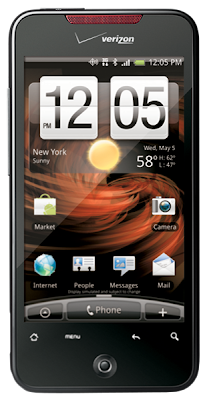
If you follow us on Twitter or Facebook, you've probably gathered that Erin and I are huge fans of the HTC Droid Incredible. The wonderful people at HTC gave us each a Droid Incredible to use for a month, and we can honestly say we've never loved a phone as much as this one. After our trial with the Droid Incredible, Erin has been using her Microsoft KIN and I've gone back to my hand-me-down iPhone 3G. We've been talking about it, and we're both definitely considering a switch to Verizon to use the Incredible again. It was so handy for blogging and helpful for busy NYC life.

I'm admittedly not a tech girl, but that's what sites like mashable.com are for. I just want to know if a device is easy to use, reliable and if it'll fit nicely into my clutch when I go out.

One of the first questions people will ask me when I tell about the Droid Incredible is, "How does it compare to the iPhone?" It is definitely better than the iPhone 3GS - faster and capable of so much more. When comparing it to the iPhone 4, some of it comes down to personal preference. While I am a huge fan of Apple products and long time user of Macbook Pros and iPods, I honestly would go with the HTC Droid Incredible. I never had a dropped call. I love the camera quality and optical track pad, and I really enjoyed some of the functionalities like the universal back button and reminders and notifications in the top left corner. Ok, so let's get into the details of why I'm such a huge fan of the Droid Incredible.

Verizon coverage is great. Voice quality is super crisp and no dropped calls. I had reception everywhere I went except for underground where no one has reception (c'mon MTA).

The display is huge. There are phones with bigger screens, but the Droid Incredible is plenty big and I feel like the colors are more vibrant. One of my favorite things to look at on the Droid Incredible was the weather widget. It has the most amazing graphics, super smooth transitions and super crisp details, which brings me to my next point.

The home screen is handy. On the iPhone, the home screen is a collection of applications. On the Droid Incredible, the default home screen boldly displays the time and current weather conditions. In finer detail, the home screen includes the date and high and low temperatures for the day.

The touch menu buttons and optical track pad are easy to use. Like the iPhone, there is a home button, but better than the iPhone, there are three additional buttons - menu, back and search. I rarely used search, but the universal back button was so great. I don't know about you, but when I'm frazzled or in a hurry, I often tap the wrong part of the screen. Having a universal back button made it so easy to undo accidents. And the more I used the phone, the more I grew to love having the optical track pad. It made it easy to browse photos, as well as copy and paste text.

Typing is quick and almost typo-free. It's really easy to type with the Droid Incredible, easier than my iPhone. The Droid Incredible vibrates lightly with each tap, which makes it easier to know when to move onto the next letter. The spell check is amazing. The Droid offers a menu of suggestions including what I actually typed, what it thought I wanted to type and a few additional suggested words. I could tap to choose from the list, or even better, use the optical track pad to select. And perhaps the most amazing feature was the "Talk to Text". Erin and I each tested it in a variety of settings, and it really worked! Occasionally there were a few corrections to be made, but overall, a very impressive and convenient tool.


The 8-megapixel camera is in fact incredible. You may remember a couple Style Diary posts shot on the Droid. The quality is really impressive; it's definitely comparable to a point and shoot with a sharp auto-focus and quick reaction time. Erin and I loved using the Droid Incredible to snap photos at sample sales. It was quick and easy to take pictures and upload. The upload menu includes options to email, Bluetooth transfer or directly upload to Facebook, Flickr, etc. The Droid Incredible was also handy for pictures out at night. It has a two-LED flash compared to the iPhone 4's one. Oh, and did I mention video? We tested it out in the streets of East Village and even with the background noise, the video and sound quality were quite nice.

It can support flash! Unlike the iPhone, the HTC Droid Incredible can load flash heavy websites and stream contents from sites like soundcloud.com.

The Droid syncs seamlessly with Gmail and Google calendar. The HTC Droid Incredible came with its own email application, but the real winner was the Gmail application. I synced both applications up with my email addresses, and the Gmail app often alerted me to new messages a second or two faster than the HTC app. The Gmail app was easy to use and just like the web version.

It's easy to stay connected to Facebook and Twitter. The Facebook app for iPhones is better than the one for the Droid, but with Verizon's fast network and the Droid Incredible's smooth browser, I would visit touch.facebook.com to check messages, photos, etc. Erin was able to use HTC's Twitter app, but for some reason it didn't work for me, which wasn't a big deal since I actually really liked the official Twitter app.

There are global notification badges at the top of the screen. Rather than having to check individual apps, whenever I had a new email, Facebook comment, Twitter direct message or software update, I would be alerted by icons in the left corner.

The phone is light and super slim. It fit nicely into all of my bags, even clutches - no lumps! I also liked the matte finish on the back. It's a small detail, and at a glance perhaps less sexy than the shiny finish on other phones, but I appreciated that the matte finish didn't show finger prints. And while I'm on the topic of details, the inside casing and battery are red!

The Droid Incredible has a replaceable battery and expandable memory via a microSD slot. The battery life on the Droid wasn't great. I usually had to pace myself and be mindful of use if I wanted the battery to last through the day. I found that during the week when I had work it would last me well into the evening, but on weekends I found myself needing to recharge before going out. As for memory, the phone comes with 8GB internal and can support up to 32GB on a microSD card.

Some of the user experience didn't feel super smooth, but overall no major complaints. I wish the battery lasted longer, but I think that's the story with all smartphones. It's a phone, mp3 player, camera and entertainment device, so of course it's going to run out of juice. I also wish more fun one-off apps were available for the Droid, but I imagine with time as the operating system becomes more popular more apps will be available in the Droid marketplace.

I've recommended HTC Droid Incredible to many of my Verizon-loyal friends, and of the ones who have it, they are all very pleased. The phone is available exclusively on Verizon - $199 with two year contract. If you're in the market for a new smartphone, Erin and I highly recommend checking out the HTC Droid Incredible. For more information or to purchase the Droid Incredible, please visit htc.com.

Monday, July 5, 2010

Kin Phone Review

Sorry for the delay but I wanted to give this phone a fair shake to accurately be able to review the product. Unfortunately just days after I finished sorting through all my thoughts, Microsoft has decided to "kill the Kin" just 6 weeks after it's launch. However, it is still up for sale on the Verizon website should you still be interested.

I've never had a touch screen phone before so it took a little adjusting but the Kin is a great little phone if you don't like complicated. It's really straightforward and easy to use. It's a phone but it's also a great tool for keeping you in touch with your friends and aware of what is going on.

It's interface is super simple to use as you can slide between 3 screens and tap to select or press a button to go back. If I was still a teen I think I would be in love with this phone as it makes social networking a breeze and only took minutes to set up my Windows Live, Twitter and Facebook accounts. Once these accounts were set up they instantly imported contacts to my phone. The Kin also has a visual feed of my friends on the main page, called the Loop, of real time status updates and tweets. I also think the phone has a great feature with being able to send Facebook and Twitter updates not only with ease but simultaneously! It's also super easy to comment on friends Facebook updates by clicking on whatever it is on the feed that intrigues you. Unfortunately replying to Tweets is not so easy and must be done manually. I also wish the phone had a feature to easily Re-Tweet and also remember your friend's Twitter handles.

The design is little and cute with it's rounded edges. It almost looks like a make-up compact! It slides open to reveal a full Qwerty keyboard. Clearly this phone was created for the young as there is a symbols button that takes you to a variety of emoticons ready to put to use but you have to hit next to a 2nd screen before you can find a "$" or "_" which can be mildly annoying if you are writing about sample sales as I often do or typing out a friend's twitter name.

Kin is actually the first cloud phone so it doesn't store data on the phone itself but instantly transports all data onto a website that you can access all your contacts, photos or anything else you might need in the event you forget your phone on a mirrored website called Kin Studio. It's great because you lose your phone you don't lose everything that's on it. It also makes for super speedy photo/video upload capabilities. I've recently tried uploading photos/video via a Droid Phone, and with the Kin there is no waiting but the Droid took some time for multiple photos even when using wifi.

The camera is quite decent for a little phone and it even has a flash! The flash is super useful for taking pictures of friends while you're out but doesn't work very well if you try to use it at a distance for scenery or concert shots.

I personally found that talking on the phone is a little digital sounding but I'm not sure if it's the phone or the Verizon network. I also liked how the phone grouped text conversations and call history. I do also wish there was an easier way to re-dial friends that you've just been talking to like on most phones, instead of having to look them up in your phonebook/favorites.

At first I was shocked that battery life couldn't seem to get me through the day (it would be fine but if I were to go out late at night it would want to die before I got back home) but after turning the brightness of the screen way down it seems to do just fine and I can make it through the day with ease. All phones that are used for features other than just talk/text seem to suffer the same battery life issues. Fortunately, as most recent phone releases this one charges on a USB cord which can come in handy for emergency charging sessions at the office/a friend's house.

A couple of things that bother me about the Kin are the lack of Calender and lack of games. I definitely am one to use my calender all the time as I have a hard time keeping track of events, concerts, parties and hang outs. Apparently since the phone is still relatively new, this was lower on the priority list after surveying people of their most important daily needs. I am not much of a gamer but I love them for waiting on the subway or to kill time when waiting for friends. As a phone that is geared towards young people I would think that this would have been a more important feature that would have been developed.

Checking email on this phone is a breeze and I love that you can effortlessly switch from account to account by just sliding your finger sideways. It's great if you're like me and have multiple email accounts to check back and forth between. I also loved that with a 2 finger tap you can delete multiple emails at once. It really comes in handy if your account becomes bombarded by email advertisements/newsletters that you don't really have time to read as mine often does. The only downfall with the email function I found was not being able view emails that had code/images embedded with ease unless I later returned to them from an actual computer.

In terms of music, this phone features Zune music player but as my current laptop is very old and decrepit (4+years) I wasn't able to properly run Zune without everything on my computer wanting to die, so unfortunately I couldn't test this feature.

I think I would have loved this phone as a teenager or conversely if I was someone who didn't grow up using computers and wanted something simple, straightforward with extras that make it a little bit more than just a phone. However, if you are looking for a smartphone, this is not a smartphone, even if monthly service plans are priced as though it was. Verizon's monthly costs will run you about $70 (thanks @jonfingas), which is the same as a Droid phone which is capable of doing much more. Perhaps pricing/carrier choice may be the larger reason for the phone's failure than the product itself.
Related Posts Plugin for WordPress, Blogger...